 Print
Print
 Close
Close

Samsung Messages ending? What Android owners must know
By Kurt Knutsson, CyberGuy Report
Published April 11, 2026

You may be hearing that Samsung Messages is going away, and for many Android users, that's true. Samsung is quietly phasing out its Samsung Messages app and moving people to Google Messages as the default texting platform, with a planned cutoff around July 2026 in the U.S. Newer Galaxy phones already come with Google Messages preinstalled, and Samsung Messages is no longer available to download on many newer devices.
That shift is real. But the way people are finding out about it is causing confusion. For many people, it starts with a text that doesn't feel quite right. They're checking their phone, and suddenly a text pops up warning that their messaging app is going away. That's exactly what happened to Gilberto of Running Springs, Calif. He wrote to us saying, "I just received a text on my Android phone advising me that Samsung Messages was going to end on July 6th, 2026 and that I needed to change to Google Messages. Is that true or a scam? I am a fan and enjoy your newsletter."
Gilberto is not alone. A growing number of Android owners are seeing similar alerts, and they're leaving people unsure what's real and what's a scam. Here's what's real, based on Samsung and Google's latest moves.
Sign up for my FREE CyberGuy Report
- Get my best tech tips, urgent security alerts and exclusive deals delivered straight to your inbox.
- For simple, real-world ways to spot scams early and stay protected, visit CyberGuy.com, trusted by millions who watch CyberGuy on TV daily.
- Plus, you'll get instant access to my Ultimate Scam Survival Guide free when you join.
MICROSOFT 'IMPORTANT MAIL' EMAIL IS A SCAM: HOW TO SPOT IT
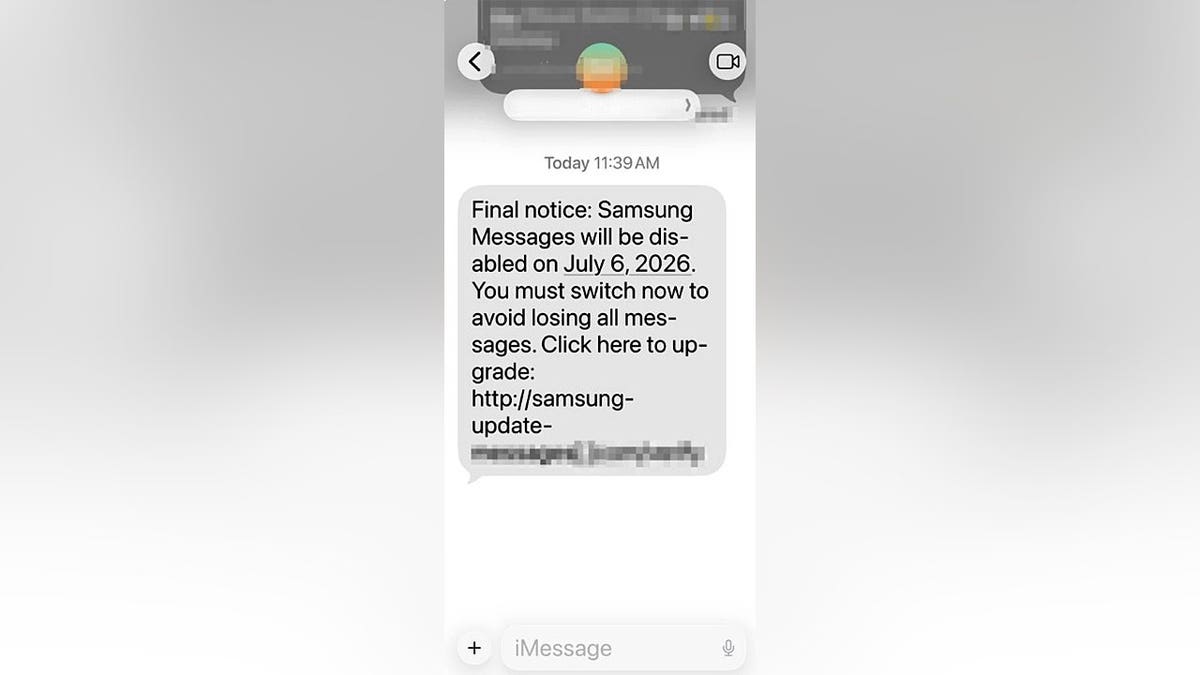
Scam texts like this use urgency and official-looking language to trick you into clicking dangerous links (Kurt "CyberGuy" Knutsson)
What's actually happening with Samsung Messages
Samsung says Samsung Messages will be discontinued and is pushing people to switch to Google Messages. Google Messages is already the default texting app on many Galaxy phones.
Here's what we know right now:
- Newer Samsung Galaxy devices already ship with Google Messages as the default
- Samsung Messages is still available on many older phones, but it is no longer the focus
- Samsung says the app is expected to be discontinued in July 2026 for customers in the United States and advises checking the Samsung Messages app for the exact shutdown date
- Some Galaxy phones may show an in-app notification guiding you to switch to Google Messages
- Owners of newer Galaxy devices already cannot download Samsung Messages, and all devices will lose access to download it after the July 2026 cutoff
Samsung has not made a dramatic shutdown announcement inside settings or via official alerts. Instead, this is more of a phased shift tied to Google's push for RCS messaging.
Why Samsung is moving to Google Messages
This change is not random. It's about standardizing how texting works across Android.
Google has been pushing RCS, which stands for Rich Communication Services. Think of it as the Android version of iMessage.
With Google Messages, you get:
- Read receipts and typing indicators
- High-quality photo and video sharing
- Better group chats
- Spam protection powered by Google
- Access to newer Google features, including AI tools powered by Gemini, like suggested replies and experimental features such as image generation inside chats
- Built-in security improvements, including AI-powered scam detection and stronger spam filtering to help block suspicious messages
Samsung has decided it makes more sense to partner with Google rather than maintain a separate messaging platform.
TAX SEASON SCAMS 2026: FAKE IRS MESSAGES STEALING IDENTITIES

As Samsung shifts to Google Messages, many people are receiving confusing alerts that can be easy to misinterpret. (Kurt "CyberGuy" Knutsson)
So is that text message real or a scam?
Here's where things get tricky.
- The change itself is real
- The text message Gilberto received may not be
Samsung does not typically send standalone text messages with links asking you to switch apps. That creates a perfect opening for scammers.
How to tell if the message is legit
Here's what to look for:
Signs the message could be legitimate
- You see a notification inside your phone's system settings
- The alert appears within your existing messaging app
- Links go directly to official sources like Google Play
Red flags that point to a scam
- A random text with a link
- Messages that pressure you to act quickly
- Requests for login details or payment
- Strange sender numbers or email-style addresses
Scammers know people are already hearing about this change, and they're using that confusion to make their messages look real.
Taking a moment to verify a message before tapping can protect your data, your money and your identity. (Kurt "CyberGuy" Knutsson)
What you should do right now
You don't need to panic. You just need to take control of the process.
1) Ignore the link
Even if the message looks convincing, do not tap anything inside it. It could take you to a fake site designed to steal your information. It's also smart to have strong antivirus software on your phone, which can help block malicious links and warn you about suspicious activity before any damage is done. Get my picks for the best 2026 antivirus protection winners for your Windows, Mac, Android & iOS devices at Cyberguy.com.
2) Check your phone manually
Open the Google Play Store and search for Google Messages. If it is already installed, you are ahead of the game. If you're using a newer Galaxy phone, you may already have Google Messages as your default and may not see Samsung Messages at all.
3) Switch in a safe way
Open Google Messages. If it is not already installed, download it from the Google Play Store. When you open it, tap "Set default SMS app," select Google Messages, then confirm "Set as default."
If you do not see that prompt, go to Settings > Apps > Choose default apps > SMS app (this may appear as "Default apps" on some devices), then select Google Messages.
4) Your existing texts should appear in Google Messages
When you switch your default messaging app, your SMS and MMS message history should automatically appear inside Google Messages. Google and Samsung both indicate that existing conversations transfer during the switch. In most cases, that means you will keep your existing text messages and won't lose your conversation history when you switch apps. It is still a good idea to open Google Messages after switching and confirm your threads are there before removing or disabling Samsung Messages.
5) Reduce your exposure online
Scammers don't just guess your number. They often get it from data broker sites and other places where your personal information is already floating around online. That's why it's smart to use a data removal service, which can help remove your phone number and personal details from these sites. The less information that's out there, the harder it is for scammers to target you with texts like this in the first place. Check out my top picks for data removal services and get a free scan to find out if your personal information is already out on the web by visiting Cyberguy.com.
What Samsung and Google are not telling you clearly
Here's the part that frustrates many people. This transition is not being communicated in a consistent or highly visible way. Some Galaxy phones may show notices inside Samsung Messages or system prompts, but there is no single, universal alert reaching everyone at once. Instead, it's a gradual shift tied to device updates, software versions and Google's messaging strategy. That uneven rollout is exactly what creates confusion and gives scam texts an opening.
Who may not be affected?
Some older Samsung phones may continue to use Samsung Messages for now, especially if they are no longer receiving major software updates.
However, Samsung has not given a clear cutoff for the Android version, so the timeline can vary depending on your specific device, carrier and region.
You can check your Android version by going to Settings > About phone > Software information > Android version.
Why this matters for you
This is bigger than just switching apps.
It highlights a growing pattern:
- Real tech changes create confusion
- Scammers jump in immediately
- People get caught in the middle
Right now, this change applies to U.S. customers, and timing may vary elsewhere. That kind of uncertainty is exactly what scammers look for, which is why it's critical to verify any message before you act. Don't want to use Google Messages? Here are your options
We're hearing from readers who don't trust Google and aren't sure what to do, especially if family members use iPhones.
Here's the reality:
- Use Google Messages (default option) Works with everyone, including iPhones. No one else has to change anything
- Use Signal for privacy More secure, but only works if your contacts also use it
- Apps like WhatsApp or Telegram Both sides need the app
Best practical setup: Use Google Messages for everyday texting, and Signal for private conversations.
Take my quiz: How safe is your online security?
Think your devices and data are truly protected? Take this quick quiz to see where your digital habits stand. From passwords to Wi-Fi settings, you’ll get a personalized breakdown of what you’re doing right and what needs improvement. Take my Quiz here: Cyberguy.com.
CLICK HERE TO DOWNLOAD THE FOX NEWS APP
Kurt's key takeaways
Gilberto's instinct to question that message was the right move. The switch to Google Messages is real, but the text he received might not be. When tech companies make quiet changes, scammers step in fast. The safest move is simple. Ignore unexpected links, verify everything yourself and make the switch on your terms, not theirs.
Should big tech companies be doing more to clearly warn you about major changes like this before scammers step in and fill the gap? Let us know by writing to us at Cyberguy.com.
Sign up for my FREE CyberGuy Report
- Get my best tech tips, urgent security alerts and exclusive deals delivered straight to your inbox.
- For simple, real-world ways to spot scams early and stay protected, visit CyberGuy.com trusted by millions who watch CyberGuy on TV daily.
- Plus, you'll get instant access to my Ultimate Scam Survival Guide free when you join.
Copyright 2026 CyberGuy.com. All rights reserved.
https://www.foxnews.com/tech/samsung-messages-ending-android-owners-must-know