 Print
Print
 Close
Close

How to recover a purchased app you accidentally deleted from your Android
By Kurt Knutsson, CyberGuy Report
Published April 04, 2024

Have you ever switched to a new Android device or reinstalled an app, only to realize that your previously purchased apps and in-app items are missing?
Well, we're here to walk you through the steps to restore those valuable apps and in-app purchases you made in the past.
Android phone (Kurt "CyberGuy" Knutsson)
How to restore apps and in-app purchases
Settings may vary depending on your Android phone’s manufacturer.
- First, launch the Google Play Store on your Android device. Make sure you’re signed in with the same Google account you used to make those purchases.
- Tap the profile icon located in the top-right corner of the Play Store screen.
- Confirm that you’re using the same profile associated with your past purchases.
- Look for the option labeled Manage Apps and Device (the exact wording may vary slightly).
- Tap on it to proceed.
GET FOX BUSINESS ON THE GO BY CLICKING HERE
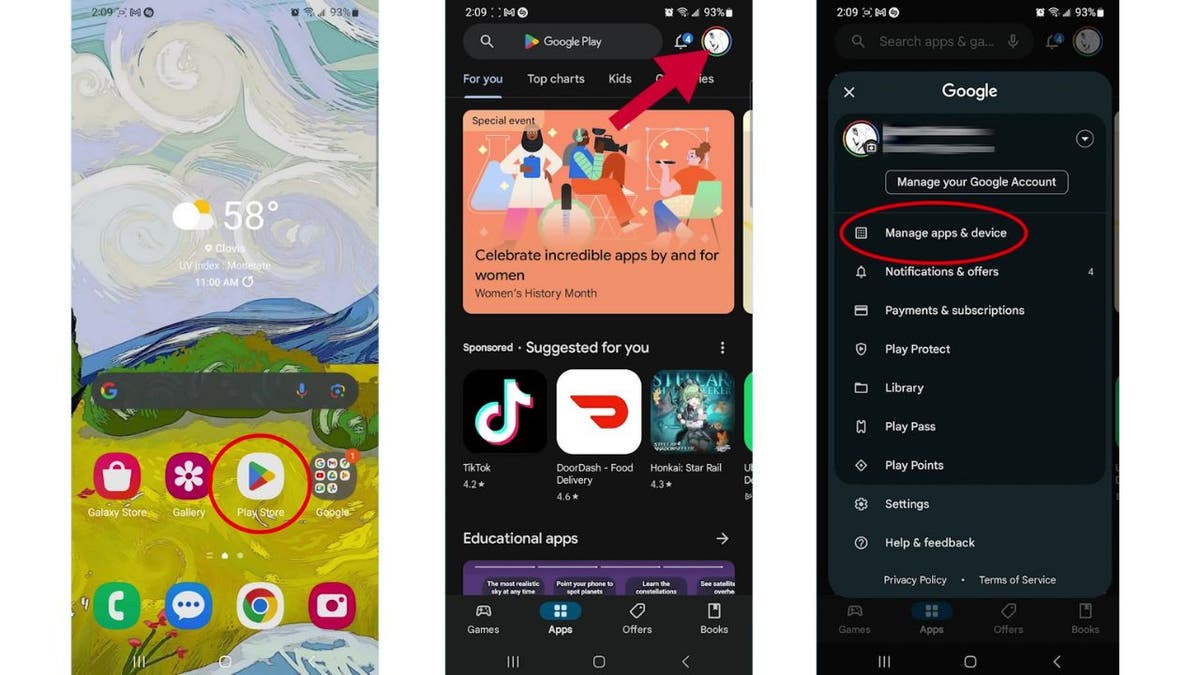
Steps to restore apps and in-app purchases (Kurt "CyberGuy" Knutsson)
MORE: BEST ACCESSORIES FOR YOUR ANDROID
- Within the "Manage" section, locate the category that says "Installed."
- Now, select "Not Installed" to view a list of apps that are currently not installed on your Android device.
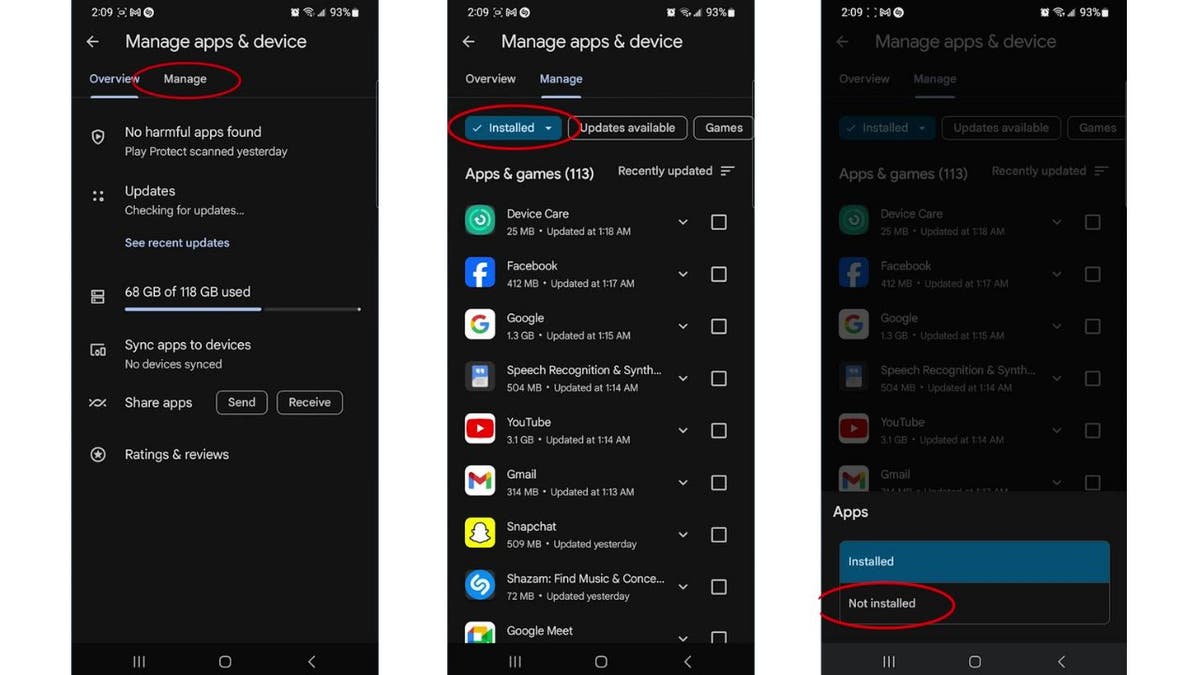
Steps to restore apps and in-app purchases (Kurt "CyberGuy" Knutsson)
MORE: HOW TO CANCEL SUBSCRIPTIONS ON ANDROID TO SAVE MONEY
- Review the list of apps. Check the boxes next to whatever apps you want to restore.
- Once you’ve made your selections, tap the download button to begin the reinstallation process.
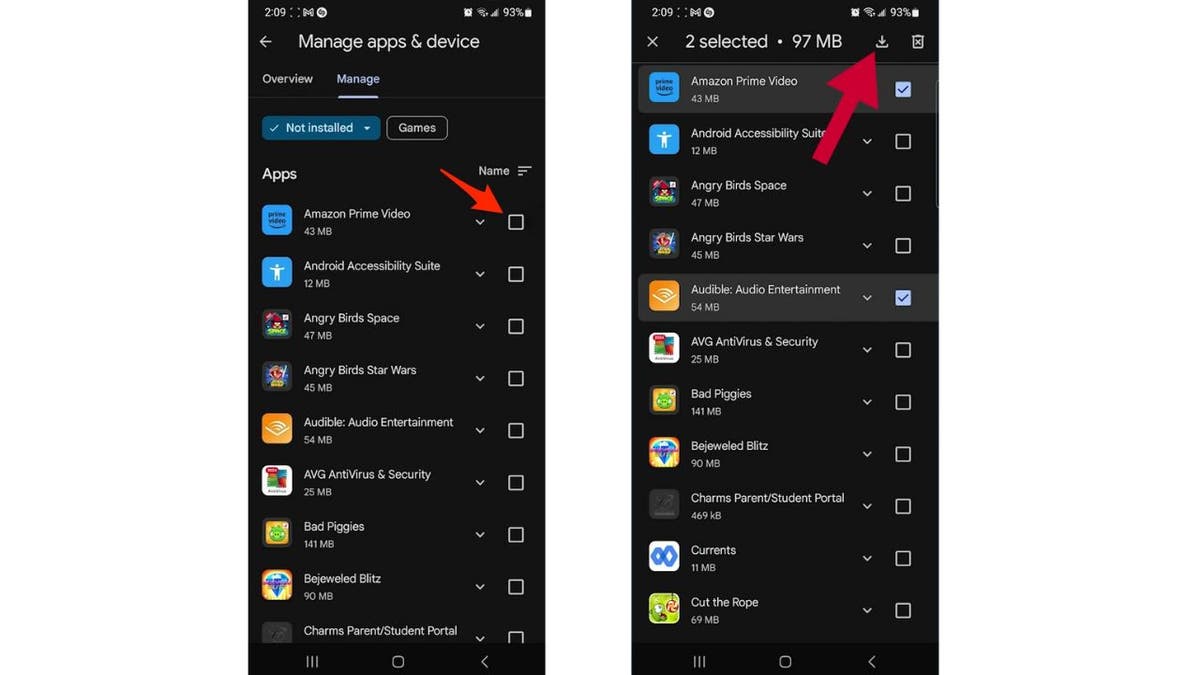
Steps to restore apps and in-app purchases (Kurt "CyberGuy" Knutsson)
- Most in-app purchases you’ve made within the apps will automatically reinstall along with the app itself. However, keep in mind that it might take several minutes after the app’s installation for the in-app balances to appear.
MORE: HOW TO CHANGE NOTIFICATION SOUNDS ON YOUR ANDROID
Kurt's key takeaways
Restoring your apps and in-app purchases is straightforward and ensures that you don’t lose access to valuable content. Remember to keep your Google account consistent across devices to maintain a seamless experience. So, the next time you switch phones or reinstall an app, follow these steps, and you’ll have your favorite apps and in-app goodies back in no time.
CLICK HERE TO GET THE FOX NEWS APP
What other challenges have you faced when moving your apps and data to a new device? Let us know by writing us at Cyberguy.com/Contact.
For more of my tech tips & security alerts, subscribe to my free CyberGuy Report Newsletter by heading to Cyberguy.com/Newsletter.
Ask Kurt a question or let us know what stories you'd like us to cover.
Answers to the most asked CyberGuy questions:
- What is the best way to protect your Mac, Windows, iPhone and Android devices from getting hacked?
- What is the best way to stay private, secure and anonymous while browsing the web?
- How can I get rid of robocalls with apps and data-removal services?
Copyright 2024 CyberGuy.com. All rights reserved.
https://www.foxnews.com/tech/how-to-recover-purchased-app-you-accidentally-deleted-from-your-android