 Print
Print
 Close
Close

How to recover a purchased app you accidentally deleted from your iPhone
By Kurt Knutsson, CyberGuy Report
Published March 27, 2024
Have you ever accidentally deleted an app from your iPhone that you’ve already paid for? Don't worry. We’ve got a trick that will save your day — and your wallet — by getting it back without having to buy it again.
HOW TO PROTECT YOUR IPHONE CALENDAR FROM DISTRACTING SPAM INVITATIONS
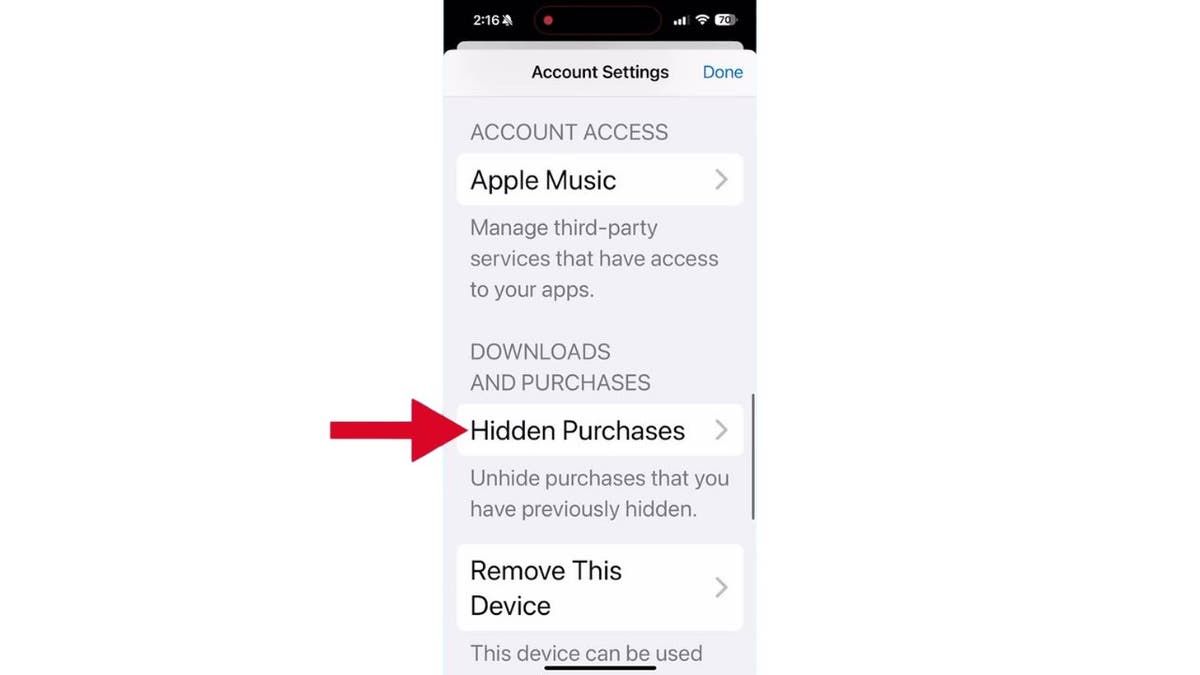
Go to the Hidden Purchases feature on your iPhone. (Kurt "CyberGuy" Knutsson)
How to recover a deleted app that you purchased on iPhone
Let’s tackle this step by step. Grab your iPhone or iPad to get started.
- Open the Settings app. You’ll find it on your home screen with the familiar gear icon.
- Tap on your Apple ID at the top of the settings menu. Remember to use the same Apple ID that you used to purchase the app originally.
- Now, select ‘Media and Purchases’
- Tap View Account. You might need to sign in with your Apple ID
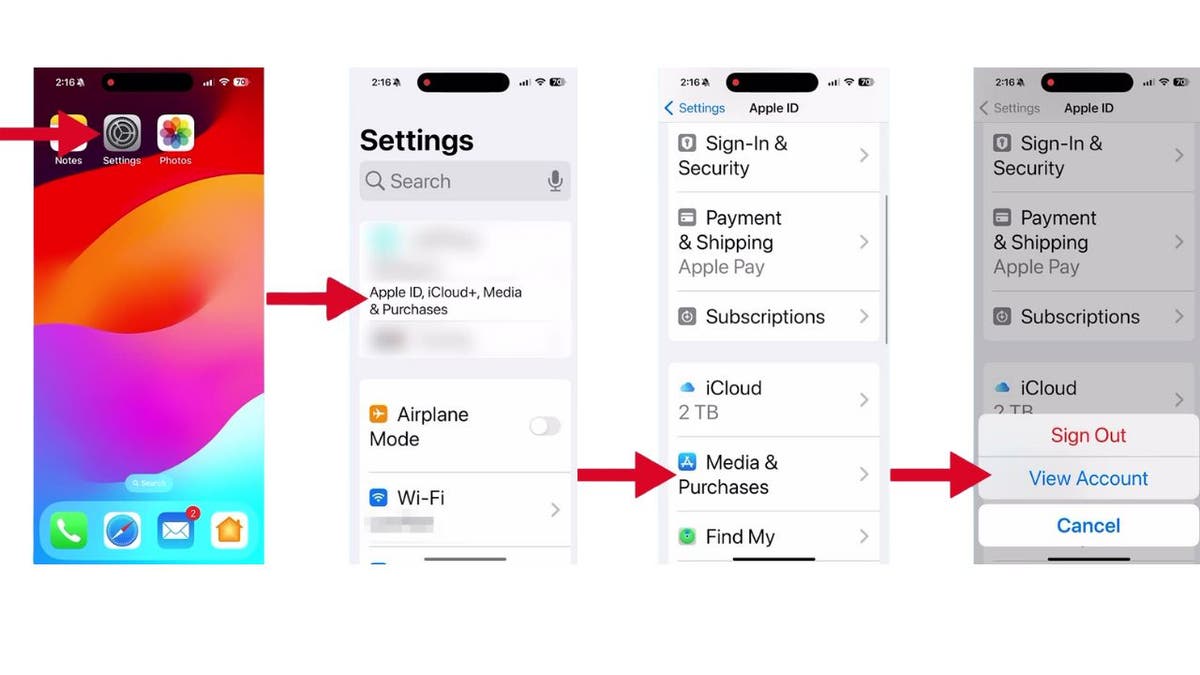
Steps to recover a deleted app that you purchased on your iPhone. (Kurt "CyberGuy" Knutsson)
- Scroll down until you find Hidden Purchases, and tap it. This is where apps go to hide when they think you don’t need them anymore.
- From the list, simply tap Unhide next to the app you want to bring back to life.
- Tap Continue
- Now, click the download icon with a cloud and a down arrow to begin downloading the app back onto your device.
THE IPHONE PRIVACY SETTING YOU NEED TO TURN OFF
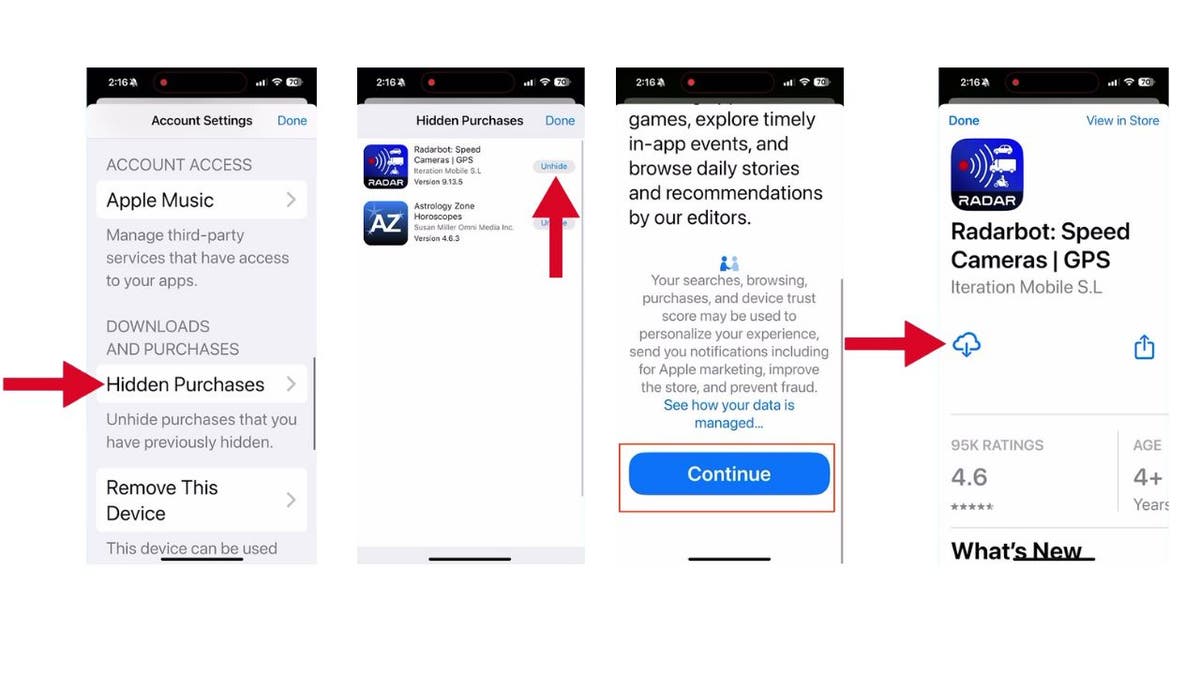
Should app stores make it easier to find previously purchased apps? (Kurt "CyberGuy" Knutsson)
You should be able to recover that app without forking over any more cash. It’s like finding digital loose change in the couch cushions.
Kurt's key takeaways
Isn’t technology great? With just a few taps, you can undo a mistake that could have cost you money. It’s a reminder that even in our fast-paced digital world, there are still simple solutions to our problems.
HOW TO UPDATE YOUR PASSCODE ON IPHONE
Should app stores make it easier to find previously purchased apps? Why or why not? Let us know by writing us at Cyberguy.com/Contact
For more of my tech tips & security alerts, subscribe to my free CyberGuy Report Newsletter by heading to Cyberguy.com/Newsletter
Ask Kurt a question or let us know what stories you'd like us to cover.
Answers to the most-asked CyberGuy questions:
- What is the best way to protect your Mac, Windows, iPhone and Android devices from getting hacked?
- What is the best way to stay private, secure, and anonymous while browsing the web?
- How can I get rid of robocalls with apps and data removal services?
Copyright 2024 CyberGuy.com. All rights reserved.
https://www.foxnews.com/tech/how-recover-purchased-app-accidentally-deleted-iphone